Security groups & rules
A security group gives its API keys an access level and an ordered list of rules. For every request made with one of those keys, Sentinel runs the rules to decide whether to allow the request and how hard to challenge it: proof-of-work cost, code challenge, Human Interaction Signature (HIS), classifier settings and rate limits. Security groups are how you tune Sentinel per site or per backend.
A security group belongs to one account. Its access (public, restricted or full) decides which endpoints its keys can call. A full group can also have a role, which root sets; it gives the group's keys that role's permissions on the account's management endpoints. See API keys & access levels.
How it works
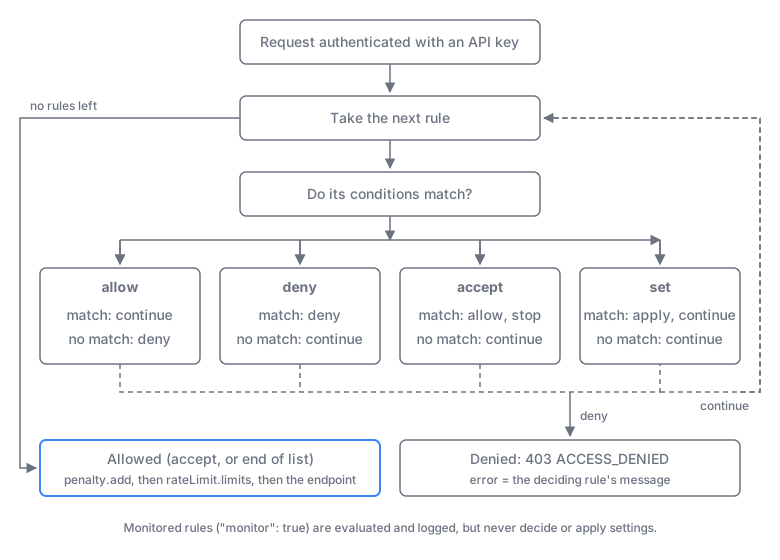
After the API key is authenticated, Sentinel takes the group's rules from top to bottom. A rule matches when it has no conditions, or when all (and, the default) or any (or) of its conditions hold.
| Action | When it matches | When it doesn't match |
|---|---|---|
allow | Continue with the next rule | Deny the request |
deny | Deny the request | Continue |
accept | Allow the request and stop: later rules aren't evaluated | Continue |
set | Apply its settings, then continue | Continue |
- Reaching the end allows. A group with no rules allows every request with default settings.
allowis a gate. It doesn't allow on its own: it denies everything that doesn't match it, and the rules after it still run.- Settings accumulate. Each matching
setrule overwrites the values of earlier ones, so put general settings first and specific ones after.setrules after a decidingdenyoracceptdon't apply. - A denied request gets
403 ACCESS_DENIED, with the deciding rule'smessageaserror. - After an allow, Sentinel adds
penalty.addto the client's penalty and then enforcesrateLimit.limits(429 RATE_LIMITED).
Conditions can test the request (ip, origin, headers, path, method, language), the client's network and location (country, network), threat intelligence (threat, threatVerdict), Web Bot Auth signatures (agent), classifier signals (signal), and two scores: the stateless risk and the stateful penalty. See Scores, risk & penalty. The complete grammar, with every field, operator and limit, is in the Rules reference.
Monitor mode
A rule with "monitor": true is evaluated but has no effect: it never denies, allows or stops evaluation, and its set entries aren't applied. When a monitored rule fires (it would have acted), Sentinel records it in the request log's context.monitor for keys with request logging on. Use monitor mode to see how often a new rule or preset would act before you turn it on. To go live, remove the flag. Monitored rules are validated like live ones, so the list will still save. In the admin UI, the option is Monitor only (no effect), and presets can be applied with Apply in monitor mode.
What set rules tune
A set rule carries 1 to 10 entries of { "field": "…", "value": "…" }. Values are always strings. The fields come in families:
| Family | Fields | What it tunes |
|---|---|---|
| Proof-of-work | pow.algorithm, pow.cost, pow.memoryCost, pow.counter, pow.expires | The challenge's algorithm and difficulty. See Proof-of-work. |
| Code challenge | codeChallenge.enabled, .length, .alphabet, .audio, .imageDifficulty | Adds an image or audio code that the visitor must type. See Code challenge. |
| HIS | his.mode, his.blockThreshold, his.hashTtl, his.penalty, his.codeChallenge | Human Interaction Signature scoring of the widget. See Human Interaction Signature. |
| Classifier | classifier.enableRules, .disableRules, .highRiskCountries, .trustedApps, .similarityGroups, .fields, .ai, .aiPurpose, .aiInstructions, .aiSignals | Defaults for classification on /v2/verify and /v2/classifier. See Classifier. |
| Rate limits | rateLimit.limits, rateLimit.scope, headerEntropy.limit, headerEntropy.penalty | Per-key or per-account limits. See Rate limiting. |
| Penalty | penalty.add | Raises or lowers the client's penalty on each allowed request. |
Defaults, value formats and ranges are in Set fields.
Presets
The admin UI's Templates tab (in the security group editor) writes ready-made rules into the group. Presets are ordinary rules named preset:<id>:<part>, for example preset:recommended:base, so you can read, edit and reorder them like your own. A group without rules has no rate limit, no threat blocking and the default proof-of-work. The Recommended preset brings these back. Add your own rules after a preset to override its settings, or put an accept rule before it to exempt trusted traffic. See Presets.
Key terms
| Term | Meaning |
|---|---|
| Security group | An access level plus an ordered rule list, applied to every key in the group |
| Rule | One entry in the list: an action, optional conditions, and a message (allow/deny) or set entries (set) |
| Match | A rule's conditions hold (or it has none) |
| Monitor mode | "monitor": true: the rule is evaluated and logged, with no effect |
| Preset | Admin UI template that writes rules named preset:<id>:<part> |
Examples
Rules are saved with the security-group endpoints of the API reference (an update replaces the whole list) or in the admin UI under Security groups. Invalid rules are rejected with 400 INVALID_RULES.
Widget key: lock to your site, harden risky networks
For a public group. Requests from other origins are denied. Every request gets a rate limit and relaxed HIS. Requests from hosting, proxy or Tor networks get a harder proof-of-work and a code challenge. Clients with a high penalty are blocked.
[
  {
    "name": "site-origins",
    "action": "allow",
    "message": "Origin not allowed.",
    "conditions": [
      { "field": "origin", "operator": "=", "value": ["https://example.com", "https://*.example.com"] }
    ]
  },
  {
    "name": "base",
    "action": "set",
    "set": [
      { "field": "rateLimit.limits", "value": "30/10m" },
      { "field": "his.mode", "value": "relaxed" }
    ]
  },
  {
    "name": "risky-network",
    "action": "set",
    "conditions": [{ "field": "network", "operator": "=", "value": ["hosting", "proxy", "tor"] }],
    "set": [
      { "field": "pow.counter", "value": "1-40000" },
      { "field": "codeChallenge.enabled", "value": "true" }
    ]
  },
  {
    "name": "repeat-offender",
    "action": "deny",
    "message": "Too many failed attempts.",
    "conditions": [{ "field": "penalty", "operator": ">=", "value": ["8"] }]
  }
]
With [inspect] security_rules = true (for debugging only), GET /v2/inspect shows how each rule evaluated, even when the rules deny the request:
curl 'https://sentinel.example.com/v2/inspect?apiKey=key_…' -H 'Origin: https://evil.example'{
"code": "ACCESS_DENIED",
"error": "Origin not allowed.",
"statusCode": 403,
"data": {
"securityRules": [
{ "index": 0, "name": "site-origins", "action": "allow", "evaluated": true, "matched": false, "outcome": "deny", "monitor": false, … },
{ "index": 1, "name": "base", "action": "set", "evaluated": false, "matched": null, "outcome": null, "monitor": false, … },
…
],
…
}
}Backend key: allow your servers only, tune the classifier
For a restricted group used by your backend. Only your server IPs may use the key. Classification treats EU countries as high-risk too and skips the time-zone check. One limit is shared by all keys of the account.
[
  {
    "name": "backend-ips",
    "action": "allow",
    "message": "Unknown server.",
    "conditions": [{ "field": "ip", "operator": "=", "value": ["203.0.113.10", "10.0.0.0/8"] }]
  },
  {
    "name": "classifier-defaults",
    "action": "set",
    "set": [
      { "field": "classifier.highRiskCountries", "value": "high_risk, eu" },
      { "field": "classifier.disableRules", "value": "TIMEZONE_MISMATCH" },
      { "field": "rateLimit.scope", "value": "account" },
      { "field": "rateLimit.limits", "value": "600/1m(key=uid)" }
    ]
  }
]
Trying a block in monitor mode
Verified agents skip all later rules. The geo block is only monitored, so it is logged in context.monitor without denying anyone. Command-line clients and HTTP libraries are denied.
[
  {
    "name": "trusted-agents",
    "action": "accept",
    "conditions": [{ "field": "agent", "operator": "=", "value": ["verified"] }]
  },
  {
    "name": "geo-block",
    "action": "deny",
    "monitor": true,
    "message": "Not available in your region.",
    "conditions": [{ "field": "country", "operator": "=", "value": ["high_risk"] }]
  },
  {
    "name": "cli-clients",
    "action": "deny",
    "message": "Automated clients are not allowed.",
    "conditions": [{ "field": "signal", "operator": "=", "value": ["CLI", "LIBRARY"] }]
  }
]
When the request logs show that the geo block would only catch traffic you want to block, remove "monitor": true.