Introduction to Sentinel
ALTCHA Sentinel is a self-hosted, next-generation security layer that protects your forms, sign-ups, logins, and APIs from bots and automated abuse — without adding friction for real users.
Where the open-source ALTCHA widget relies on a single mechanism (proof-of-work), Sentinel is a full detection system. It combines multiple signals — interaction-based, contextual, and machine-learning-based — to score risk in real time and respond proportionally: legitimate visitors pass through unnoticed, while suspicious or automated traffic is challenged, throttled, or blocked.
Sentinel runs on your own infrastructure. You control the data, the deployment, and the configuration.
For a concise overview you can share with stakeholders, see the Sentinel Executive Brief (PDF).
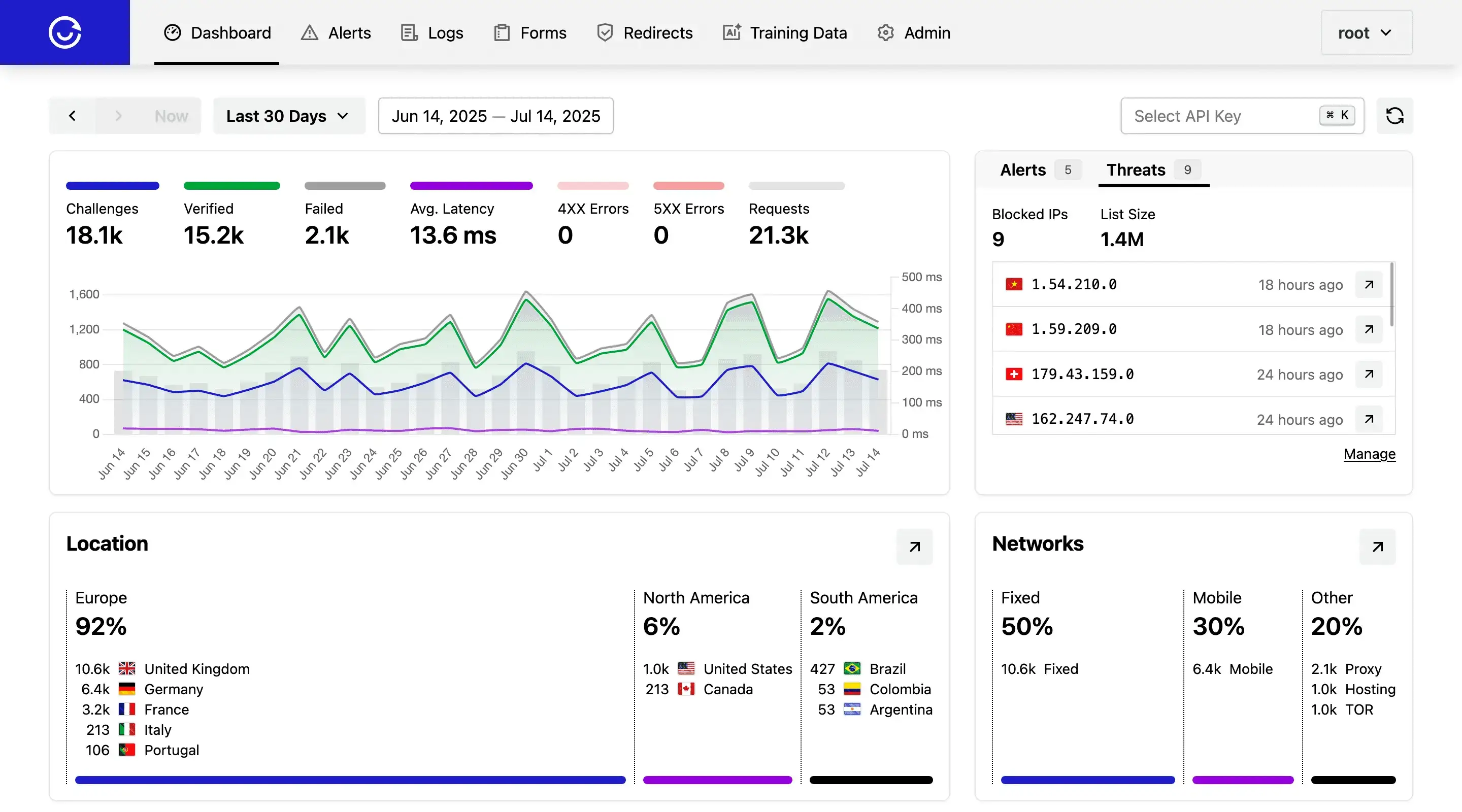
Beyond Static Defenses
Static defenses — a fixed challenge, a fixed rule, a static IP blocklist — are easy for bots to adapt to. Sentinel instead treats every request as a data point and continuously adjusts:
- It adapts. Challenge difficulty and enforcement policy shift automatically based on live traffic patterns, not a config you set once and forget.
- It correlates signals. No single check has to carry all the weight — interaction analysis, content classification, IP reputation, and more are combined into one risk decision.
- It stays invisible to real users. The goal is zero added friction for humans. Challenges only escalate when risk actually warrants it.
- It's yours. Self-hosted deployment means your traffic and user data don't pass through a third-party service.
How it fits together
At a high level, a request flows through Sentinel like this:
- Signal collection — Sentinel gathers context about the request: interactions, headers, IP reputation, submitted content, and more.
- Risk scoring — These signals feed into Sentinel's detection engine (machine learning, pattern recognition, and rule-based checks) to produce a risk score.
- Adaptive response — Based on that score, Sentinel decides what happens next: let the request through silently, serve an adaptive captcha challenge, rate-limit it, or block it outright.
This is the same request/response flow described in more detail in Diagrams, extended with Sentinel's additional decision layer.
What Sentinel adds over open-source ALTCHA
| Open-Source ALTCHA | Sentinel | |
|---|---|---|
| Core mechanism | Proof-of-work challenge | Proof-of-work + adaptive, risk-based decisioning |
| Deployment | Client widget + your verification server | Self-hosted server + client widget |
| Bot detection | Computational cost only | Interaction-based, contextual, and ML-based signals |
| Content moderation | — | Spam/content classifier, phishing detection |
| Threat intelligence | — | Real-time malicious IP blocking |
| Rate limiting | — | Context-aware, multi-layer rate limiters |
| Tuning | Manual | Autopilot (automatic difficulty/policy adjustment) |
If you're already using open-source ALTCHA, Sentinel is a drop-in upgrade: the same widget integration pattern, with a much more capable server behind it.
Core capabilities at a glance
- Adaptive Captcha — scales from a frictionless proof-of-work check up to an interactive Code Challenge based on risk, not a fixed difficulty for everyone.
- Human Interaction Signature (HIS) — interaction analysis that estimates automation probability and resists replay.
- Autopilot — self-tuning challenge policy based on observed traffic.
- Threat Intelligence — real-time IP blocking from open-source and live-traffic sources.
- Classifier — NLP-based spam and content scoring.
- Phishing Detection — URL validation against known phishing sources.
- Similarity and Training Data — pattern-matching against example datasets for moderation.
- Rate Limiters — flexible, multi-layer abuse throttling.
See the full Features overview for details on each.
Common use cases
Sentinel is typically deployed to protect:
- User registration — stopping fake sign-ups and account farming.
- Login and auth flows — blocking credential stuffing and brute-force attempts.
- Form submissions — filtering spam and abusive submissions.
- Chat and forums — moderating user-generated content at scale.
- General threat detection — broad-spectrum abuse and bot mitigation.
Before you begin
Sentinel is a security- and privacy-sensitive system, so it's worth reviewing a few things before installing it:
- Integration Checklist — a launch-readiness checklist for going to production.
- Privacy Protection and License — under Security & Access.
- Pricing — compare plans and capacity.
- Legal & security documentation — EULA, Support Policy, Security Assurance Plan, and Security Compliance Framework.
Next steps
The fastest way to a working instance is the Get Started guide. Or jump straight to:
- Install Sentinel on your infrastructure (Docker, Kubernetes, cloud services, and more).
- Configure security groups, API keys, and forms.
- Embed the widget in your website or app.