How Sentinel works
A Sentinel deployment is one or more identical server processes (replicas) that share a database and a KV store. Each request passes a fixed sequence of checks before Sentinel answers it. Read this page before you plan a production install or debug an unexpected decision: knowing which check runs first tells you which error a client sees and why.
How it works
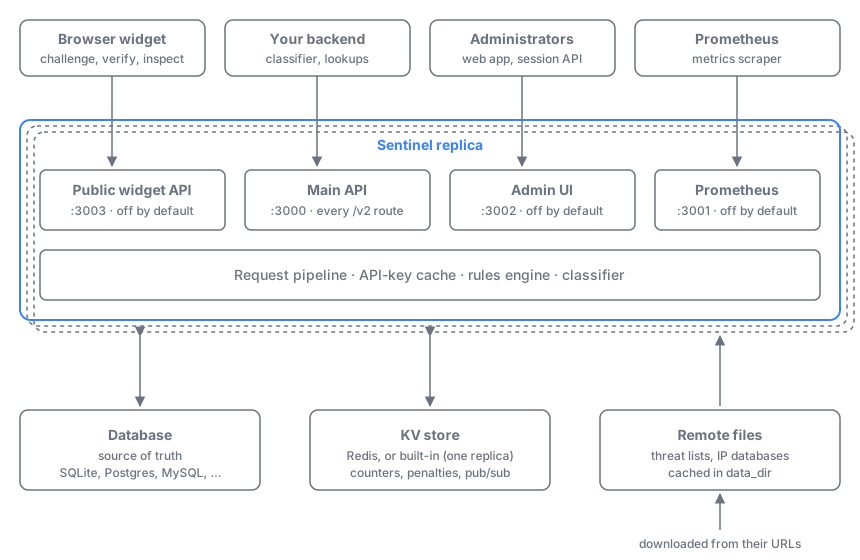
Listeners
One process can serve up to four HTTP listeners. Only the main API is on by default; you enable the others in sentinel.toml.
| Listener | Config section | Default port | Default | Serves |
|---|---|---|---|---|
| Main API | [server] | 3000 | on, 0.0.0.0 | Every /v2 route: widget, backend, and admin endpoints |
| Public widget API | [server.public_api] | 3003 | off | Only the widget endpoints (/v2/challenge, /v2/verify, /v2/inspect); every other /v2 path returns 404 |
| Admin UI | [server.admin_ui] | 3002 | off, 127.0.0.1 | The admin web app, plus /v2 exactly as on the main API |
| Prometheus | [prometheus] | 3001 | off, 127.0.0.1 | Metrics in Prometheus text format |
Separate listeners let you expose only the widget endpoints to the internet and keep the admin app and metrics on a private network. Each listener serves plain HTTP, or HTTPS with its own tls certificate, over HTTP/1.1 and HTTP/2. The [server] connection timeouts (idle, request head, request body, response write) apply to all of them. See Listeners for how to set them up, and the Configuration reference for every key.
Database
The database is the source of truth. It stores accounts, users, roles, API keys, security groups, training data, threat entries, request logs (unless you send them to ClickHouse), and the license state. Without other configuration, Sentinel uses an embedded SQLite file in data_dir. See Databases for the supported backends.
Each replica keeps API keys, their security groups, and their account states in memory (the API-key cache). The widget endpoints authenticate from this copy, so challenges and verification keep working while the database is down. Admin changes reach every replica within milliseconds.
KV store
The KV store holds short-lived shared state: rate-limit counters, penalties, header-entropy windows, and replay protection for solved challenges. It also carries the pub/sub messages that replicas use to find each other and to reload the API-key cache.
Set [redis] nodes, or [redis.sentinel] for a Redis managed by Redis Sentinel, to use Redis. Without either, Sentinel uses a built-in KV store inside its own database, which supports a single replica only. See the Configuration reference.
Remote files
Some data comes from URLs: the IP lists of threat sources and the .mmdb databases of IP resolver providers. Sentinel downloads each one, keeps a copy in data_dir, and checks for updates on a schedule. See Remote files.
Replicas
You can run several replicas behind a load balancer. They need an external database and Redis. Each replica publishes its status over the KV store's pub/sub every 10 seconds, and each one holds a license-counted instance slot in the database. See Clustering & high availability.
Request pipeline
Every /v2 request passes the same checks in this order. A check that refuses the request ends it, so later checks never run.
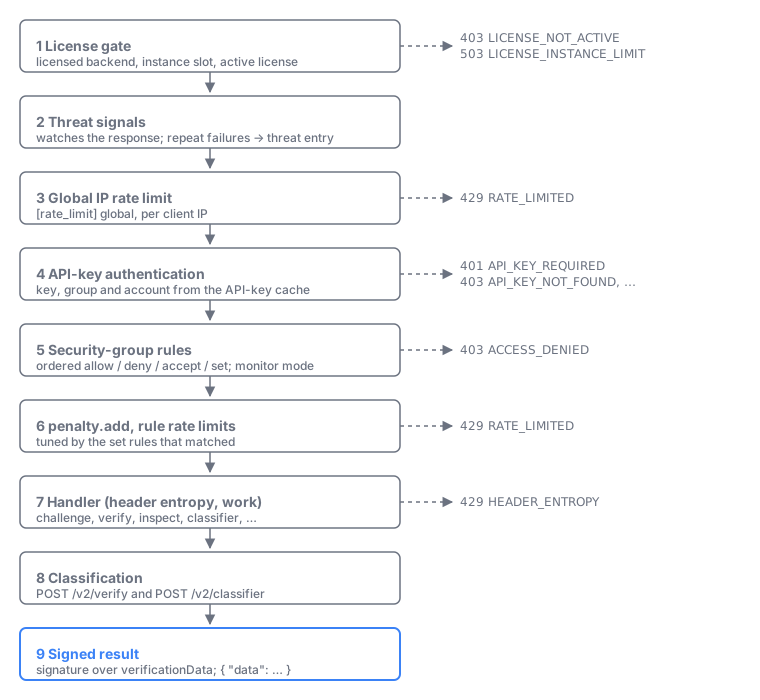
- License gate. The database backend must be licensed and the replica must hold an instance slot (otherwise
503 LICENSE_INSTANCE_LIMIT). Widget and backend endpoints also need an active license (otherwise403 LICENSE_NOT_ACTIVE). Sign-in,/v2/me*,/v2/license*, and/v2/doctor*stay open, so a root user can always install a license. See Licensing. - Threat signals. Sentinel watches the response. A client IP that keeps failing authentication or hitting the global rate limit gets an automatic threat entry. See Threat intelligence.
- Global IP rate limit. Every
/v2request, and every/v1widget alias when[server] v1_compatis on, counts against[rate_limit] global(default100/1m) for its client IP. Over the limit:429 RATE_LIMITED. Requests stopped here aren't written to the request logs. - API-key authentication. Sentinel loads the key, its security group, and its account from the API-key cache. It checks that the key is presented the way its access level requires and that the key, group, and account are usable. See API keys & access levels.
- Security-group rules. The group's ordered rules run against the request. A deny returns
403 ACCESS_DENIED; matchingsetrules collect settings for the later steps. See Security groups & rules. - Penalty and rule rate limits. On an allowed request, a matching
penalty.addupdates the client's penalty, then the group'srateLimit.limitsare counted. Over a limit:429 RATE_LIMITED. - Handler. The endpoint does its work.
GET /v2/challengeandGET /v2/inspectcheckheaderEntropy.limitfirst, if a rule sets it (429 HEADER_ENTROPY). - Classification.
POST /v2/verify(for a valid solution) andPOST /v2/classifierscore the request with the classifier settings the rules chose. See Scores, risk & penalty. - Signed result. The response is wrapped in
{ "data": … }. ForPOST /v2/verify,verificationDatacarries a signature made with the API key's secret, so your backend can trust it. See Verifying submissions.
Admin requests (session token) pass steps 1–3 the same way, then the session and the caller's role are checked instead of steps 4–6. See Accounts, users & roles.
Key terms
| Term | Meaning |
|---|---|
| Listener | One HTTP port of a Sentinel process, with its own host, port, and client-IP settings |
| Replica | One running Sentinel process |
| Instance slot | A license-counted lease that each replica holds in the database |
| KV store | Redis, or the built-in store on the database; holds counters, penalties, and pub/sub |
| Remote file | A list or database that Sentinel downloads and refreshes on a schedule |
| API-key cache | Each replica's in-memory copy of API keys, security groups, and account states |
See the Glossary for every term.
Examples
Single node. One container with the embedded SQLite database and the built-in KV store. Only the main API on port 3000 is exposed, and the admin UI is reached through an SSH tunnel to 127.0.0.1:3002. This is the Get Started setup.
Split public and admin traffic. Enable [server.public_api] on port 3003 and publish only that port through your CDN. Widgets can reach challenges and verification, but nothing else. Keep the main API and the admin UI on the internal network for your backend and administrators.
[server.public_api]
enabled = true
port    = 3003   # the only listener reachable from the internet

[server.admin_ui]
enabled     = true
host        = "0.0.0.0"
allowed_ips = ["10.0.0.0/8"]   # office VPN only
Which check refused it? A widget gets 429 RATE_LIMITED. If the security group has no rateLimit.limits, the request hit the global limit in step 3, so it never reached the rules. Often many users share one IP because [server] trusted_proxies isn't set behind your proxy. See Doctor & troubleshooting.
Related
In this section
- Accounts, users & roles: How accounts (tenants), users, root access, memberships, and roles fit together in Sentinel's admin model.
- API keys & access levels: The three credential types (admin session, public key, and restricted or full key) and which endpoints accept each one.
- Security groups & rules: How a security group's ordered allow, deny, accept, and set rules are evaluated for each request, and how monitor mode works.
- Scores, risk & penalty: The difference between the classification score and verdict, the stateless risk score, and the stateful penalty, and where each one is used.